Hello and welcome to my little corner of internet!! I am a techie. I am very interested to discover and innovate new advances in science and technology. Blogging is one of my hobbies which I think is very useful for broadening my knowledge horizons and help me grow my skills. Apart from blogging I have also little taste in artistic skills and literature, which can keep my writing and posts tangy.
Whether you stumbled in by chance or came here on purpose, I hope you find something that sparks your curiosity or makes you think a little deeper. Thanks for stopping by!!
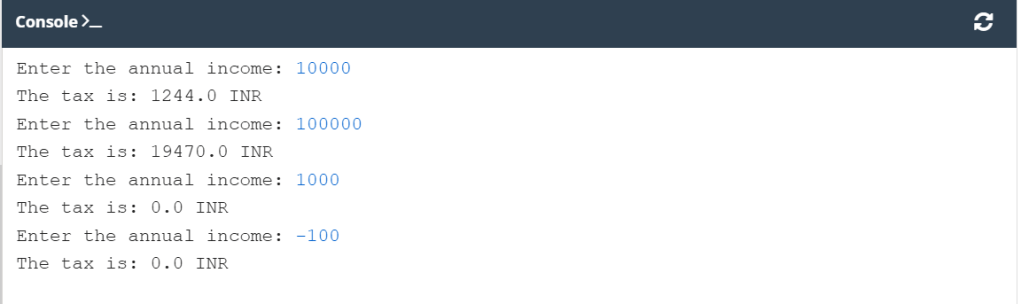
Once upon a time, there was a country inhabited by happy and prosperous people. The people paid taxes, of course – their happiness had limits. The most important tax, called the Personal Income Tax (PIT ), had to be paid yearly and was evaluated using the following rule:
If the citizen’s income was not higher than 85,528 INR, the tax was equal to 18% of the income minus 556 INR and 2 paisa (this was the so-called tax relief)
If the income was higher than this amount, the tax was equal to 14,839 INR and 2 paisa, plus 32% of the surplus over 85,528 INR.
Your task is to write a tax calculator.
It should accept one floating-point value: the income.
Next, it should print the calculated tax, rounded to the full INR. There’s a function named round() which will do the rounding for you – you’ll find it in the skeleton code in the editor.
Note: This happy country never returns money to its citizens. If the calculated tax is less than zero, it means there is no tax (the tax is zero). Take this into consideration during your calculations.
Let’s have a quick review of Bit Manipulation techniques in Python.
Bitwise Operators
Operator
Description
Example
&
Bitwise AND
a & b
`
Bitwise OR
a ` b
^
Bitwise XOR
a ^ b
~
Bitwise NOT
~a
<<
Left Shift
a << n
>>
Right Shift
a >> n
Example Program
Python
# Bit manipulation demo in Python
defbit_operations(a: int,b: int):
"""Perform common bitwise operations on two integers."""
try:
# Ensure inputs are integers
ifnotisinstance(a,int)ornotisinstance(b,int):
raiseValueError("Both inputs must be integers.")
print(f"a = {a} ({bin(a)})")
print(f"b = {b} ({bin(b)})\n")
# AND
print(f"a & b = {a&b} ({bin(a&b)})")
# OR
print(f"a | b = {a|b} ({bin(a|b)})")
# XOR
print(f"a ^ b = {a^b} ({bin(a^b)})")
# NOT
print(f"~a = {~a} ({bin(~a)})")
print(f"~b = {~b} ({bin(~b)})")
# Left shift
print(f"a << 2 = {a<<2} ({bin(a<<2)})")
# Right shift
print(f"a >> 2 = {a>>2} ({bin(a>>2)})")
exceptValueErrorase:
print(f"Error: {e}")
# Example usage
if__name__=="__main__":
bit_operations(7,3)# 7 = 0b111, 3 = 0b011
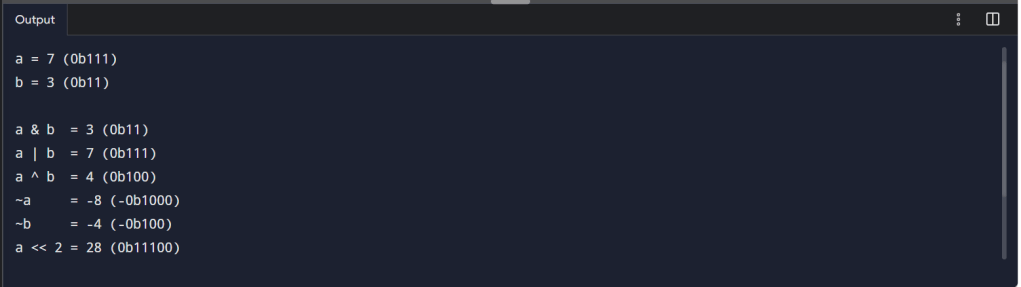
Output:
a = 7 (0b111) b = 3 (0b11)
a & b = 3 (0b11) a | b = 7 (0b111) a ^ b = 4 (0b100) ~a = -8 (-0b1000) ~b = -4 (-0b100) a << 2 = 28 (0b11100)
Bit Manipulation Tricks
Python
# Check if the k-th bit is set (0-indexed from right)
defis_kth_bit_set(n,k):
return(n&(1<<k))!=0
# Set the k-th bit
defset_kth_bit(n,k):
returnn|(1<<k)
# Clear the k-th bit
defclear_kth_bit(n,k):
returnn&~(1<<k)
# Toggle the k-th bit
deftoggle_kth_bit(n,k):
returnn^(1<<k)
# Count set bits (Brian Kernighan’s Algorithm)
defcount_set_bits(n):
count=0
whilen:
n&=(n-1)
count+=1
returncount
n=13
k=2
print(f"n = {n} Binary n: ",bin(n))
print(f"k = {k} Binary k: ",bin(k))
print("Is 'k'th bit set? ",is_kth_bit_set(n,k))
print("n after setting 'k'th bit: ",set_kth_bit(n,k),f"Binary n = ({bin(n)})")
print("n after clear 'k'th bit: ",clear_kth_bit(n,k),f"Binary n = ({bin(n)})")
print("n after toggle 'k'th bit: ",toggle_kth_bit(n,k),f"Binary n = ({bin(n)})")
print("Set bits in n: ",count_set_bits(n))
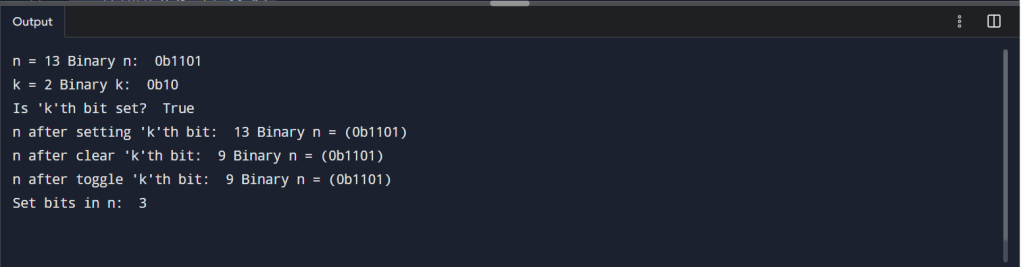
Output:
n = 13 Binary n: 0b1101 k = 2 Binary k: 0b10 Is ‘k’th bit set? True n after setting ‘k’th bit: 13 Binary n = (0b1101) n after clear ‘k’th bit: 9 Binary n = (0b1101) n after toggle ‘k’th bit: 9 Binary n = (0b1101) Set bits in n: 3
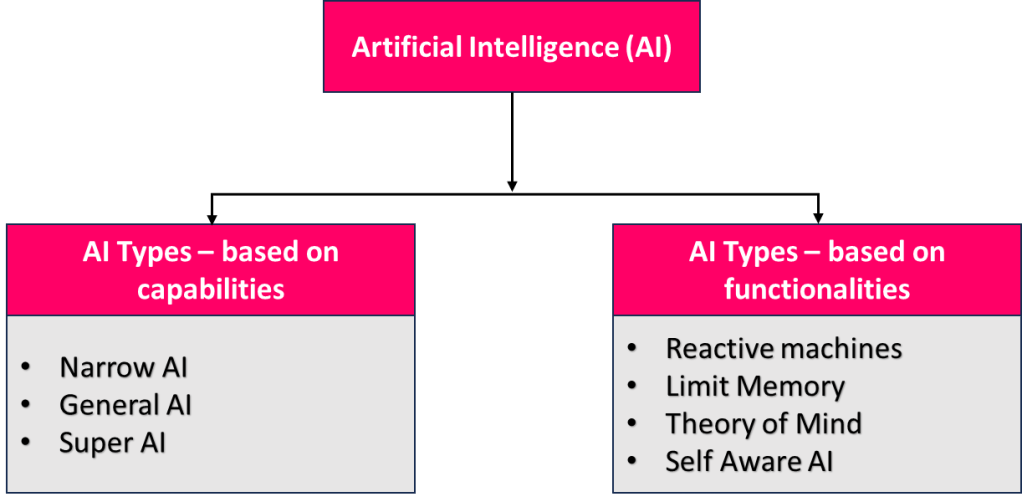
Artificial Intelligence (AI) is a trending technology around the world. Let’s understand its types.
What is AI?
Artificial Intelligence (AI) is the capability of a computational system to pursue human intelligence, like learning, reasoning, perception, problem solving, and decision making.
Types of AI
Types of AI based on capabilities:
Narrow AI (Weak AI): Narrow AI is designed and trained on a specific task or a narrow range of tasks. They perform their designated tasks but cannot generalize tasks. For example, Voice Assistants (Alexa, Siri), Face Recognition Systems, Recommendation systems like Netflix, etc.
General AI (General AI): General AI refers to machines that can perform any intellectual task like humans, with the ability to learn and adapt across tasks, though it remains theoretical and still not fully developed. For example, Autonomous Robots, AI diagnostics, Autonomous driving, cooking, and Coding.
Super AI (Super Intelligent AI): Super AI is a theoretical concept where AI surpasses human intelligence. They can make decisions of their own and solve problems on their own. For example, outperforms humans in all fields, including creative and Decision-making AI, raises ethical concerns, and controls.
Types of AI Based on Functionalities:
This classification is based on how AI handles data, memory, and decision-making in different scenarios.
1. Reactive Machines
Reactive machines purely operate based on the present data and do not store any previous experiences or learn from past actions. These systems respond to specific inputs with fixed outputs and are unable to adapt. Examples: AI Chess Bots, Pattern Recognition AI.
2. Limited Memory in AI
Limited Memory AI practices past data to make better decisions and predictions, but lacks long-term memory, and most modern AI applications belong to this type. Examples: Self-driving cars, Chatbots.
3. Theory of Mind
Theory of Mind AI tries to understand human emotions, beliefs, and intentions, enabling more sophisticated and responsive interactions. Examples: Human-Robot interface detecting emotions, Collaborative Robots in Healthcare.
4. Self-Awareness AI
Self-Aware AI is an advanced AI that holds consciousness, enabling it to understand emotions and have self-awareness like humans. Examples: Fully autonomous moral decision-making systems, environment-sensing robots.
Modern Real-World AI Systems
This classification is generally based on what the AI can do in real-world systems.
1. Generative AI (Gen AI)
Gen AI creates new content like text, images, audio, or code by learning patterns from data. It uses deep learning models like transformers. Example: Chatbots generating answers, AI image generators, and code generation tools.
2. Agentic AI
Agentic AI acts autonomously to achieve goals, making choices and executing tasks without constant human input. It can plan, execute, and adapt. Example: AI that books tickets after comparing prices, Task automation agents, and multi-step problem-solving systems.
3. Natural Language Processing (NLP)
NLP allows machines to understand, interpret, and communicate using human language. Works with text and speech. Example: Chatbots, Language translation, Sentiment analysis.
4. Computer Vision
Computer Vision allows machines to analyse, recognize, and interpret images and videos. It detects objects, faces, and patterns from visuals. Example: Face recognition, medical image analysis, and self-driving car vision systems.
Polymorphism means “many forms”. In OOP, it allows the same method name (or operator) to behave differently depending on the object or data type it is acting upon.
It helps in:
Code reusability
Flexibility
Maintainability
Types of Polymorphism in Python
Python mainly supports runtime polymorphism (method overriding) and compile-time-like polymorphism (method overloading via default arguments or *args).
1. Polymorphism with Functions and Objects
A single function can work with different types of objects.
Python
# Example: Same function name, different object types
classDog:
defspeak(self):
return"Woof!"
classCat:
defspeak(self):
return"Meow!"
defanimal_sound(animal):
print(animal.speak())
# Using polymorphism
dog=Dog()
cat=Cat()
animal_sound(dog)# Woof!
animal_sound(cat)# Meow!
Here, animal_sound() works with any object that has a .speak() method — this is duck typing in Python.
2. Polymorphism with Inheritance (Method Overriding)
Child classes can override methods from the parent class.
Python
classBird:
deffly(self):
return"Some birds can fly."
classSparrow(Bird):
deffly(self):
return"Sparrow flies high."
classPenguin(Bird):
deffly(self):
return"Penguins can't fly."
# Runtime polymorphism
forbirdin[Sparrow(),Penguin()]:
print(bird.fly())
Output:
Sparrow flies high.
Penguins can't fly.
3. Polymorphism with Built-in Functions
Many built-in functions in Python are polymorphic.
Python
print(len("Hello"))# Works on string → 5
print(len([1,2,3]))# Works on list → 3
4. Operator Overloading (Special Methods)
Operators like +, *, etc., behave differently for different data types.
print(5 + 10) # Integer addition → 15
print("Hi " + "Py") # String concatenation → Hi Py
You can define custom behavior using magic methods:
Python
classBook:
def__init__(self,pages):
self.pages=pages
def__add__(self,other):
returnself.pages+other.pages
b1=Book(100)
b2=Book(200)
print(b1+b2)# 300
Sure! Let’s break down polymorphism in Python in the context of Object-Oriented Programming (OOP).
Key Takeaways
Polymorphism lets the same interface work for different data types or classes.
In Python, it’s often achieved through method overriding, duck typing, and operator overloading.
It improves code flexibility and reduces duplication.
If you want, I can prepare a single Python program that demonstrates all types of polymorphism in one place for easy learning. Do you want me to create that?
Inheritance is a fundamental concept in object-oriented programming (OOP) that allows a class to inherit attributes and methods from another class. This promotes code reusability and establishes a hierarchical relationship between classes.
Basic Syntax and Example
In Python, inheritance is implemented by defining a new class that derives from an existing class. The derived class (child class) inherits the attributes and methods of the base class (parent class). Here is a basic example:
Python
# Parent class
classPerson:
def__init__(self,name,id):
self.name=name
self.id=id
defdisplay(self):
print(self.name,self.id)
# Child class
classEmployee(Person):
defprint_emp(self):
print("Employee class called")
# Creating an object of the child class
emp=Employee("John",101)
emp.display()# Calling parent class method
emp.print_emp()# Calling child class method
In this example, the Employee class inherits from the Person class, allowing it to use the display method defined in the Person class.
Types of Inheritance
Python supports several types of inheritance:
Single Inheritance: A child class inherits from a single parent class.
Multiple Inheritance: A child class inherits from multiple parent classes.
Multilevel Inheritance: A child class inherits from a parent class, which in turn inherits from another parent class.
Hierarchical Inheritance: Multiple child classes inherit from the same parent class.
Hybrid Inheritance: A combination of two or more types of inheritance.
Method Overriding and super()
Method overriding allows a child class to provide a specific implementation for a method that is already defined in its parent class. The super() function is used to call a method from the parent class.
Python
classAnimal:
defspeak(self):
return"Some sound"
classDog(Animal):
defspeak(self):
return"Woof!"
# Creating an instance of the Dog class
dog=Dog()
print(dog.speak())# Output: Woof!
In this example, the Dog class overrides the speak method of the Animal class.
Using super() Function
The super() function allows you to call methods from the parent class. This is useful for initializing the parent class’s attributes in the child class.
Python
classPerson:
def__init__(self,name,age):
self.name=name
self.age=age
classStudent(Person):
def__init__(self,name,age,grade):
super().__init__(name,age)
self.grade=grade
# Creating an instance of the Student class
student=Student("Alice",20,"A")
print(student.name,student.age,student.grade)# Output: Alice 20 A
In this example, super().__init__(name, age) calls the __init__ method of the Person class to initialize the name and age attributes.
Conclusion
Inheritance in Python is a powerful feature that promotes code reusability and allows for the creation of a hierarchical relationship between classes. By understanding and utilizing inheritance, you can create more efficient and maintainable code.
Abstraction is a fundamental concept in Object-Oriented Programming (OOP) that focuses on hiding the internal implementation details of a class or method while exposing only the necessary functionality. This simplifies code interaction, reduces complexity, and enhances maintainability.
In Python, abstraction is achieved using abstract classes and abstract methods, which are defined in the abc module.
Abstract Classes and Methods
An abstract class serves as a blueprint for other classes. It cannot be instantiated directly and must be subclassed. Abstract classes contain one or more abstract methods, which are declared but not implemented. Subclasses must provide their own implementation for these methods.
For example:
Python
fromabcimportABC,abstractmethod
# Abstract class
classAnimal(ABC):
@abstractmethod
defmake_sound(self):
pass# Abstract method with no implementation
# Concrete subclass
classDog(Animal):
defmake_sound(self):
return"Bark"
# Instantiate the subclass
dog=Dog()
print(dog.make_sound())# Output: Bark
In this example, Animal is an abstract class with an abstract method make_sound(). The Dog class implements the method, allowing it to be instantiated.
Key Components of Abstraction
Abstract Methods: Declared using the @abstractmethod decorator, these methods must be implemented by subclasses.
Concrete Methods: Fully implemented methods in an abstract class that can be inherited by subclasses.
Abstract Properties: Declared using @property and @abstractmethod, these enforce property implementation in subclasses.
Example of Abstract Properties
Python
fromabcimportABC,abstractmethod
classVehicle(ABC):
@property
@abstractmethod
defwheels(self):
pass
classCar(Vehicle):
@property
defwheels(self):
return4
car=Car()
print(car.wheels)# Output: 4
Here, wheels is an abstract property in the Vehicle class, and the Car class provides its implementation.
Benefits of Abstraction
Simplifies Code: Users interact with high-level functionality without worrying about internal details.
Encapsulation: Sensitive or unnecessary details are hidden, reducing misuse or accidental changes.
Flexibility: Subclasses can define specific behaviors while adhering to a consistent structure.
Maintainability: Internal changes in abstract classes do not affect external code.
Important Considerations
Abstract classes cannot be instantiated directly. Attempting to do so raises a TypeError.
Subclasses must implement all abstract methods and properties; otherwise, they too become abstract and cannot be instantiated.
Example of Instantiation Error
Python
fromabcimportABC,abstractmethod
classShape(ABC):
@abstractmethod
defarea(self):
pass
# Attempting to instantiate an abstract class
shape=Shape()# Raises TypeError
Abstraction in Python is a powerful tool for designing robust and scalable applications by enforcing a clear structure and hiding unnecessary complexity.
Encapsulation is an Object-Oriented Programming (OOP) concept where data (attributes) and methods (functions) are bundled together in a class and access to the data is controlled to protect it from unintended interference or misuse.
Why Encapsulation?
Data hiding (restricting direct access to variables)
Better maintainability
Controlled access through getter and setter methods
Access Modifiers in Python
Python does not have strict access modifiers like some other languages, but it uses naming conventions:
Modifier
Syntax Example
Meaning
Public
self.name
Accessible from anywhere
Protected
self._name
Convention: should not be accessed outside the class (still possible)
Private
self.__name
Name mangling makes it harder to access from outside
For Example:
classBankAccount:
def__init__(self,account_holder,balance):
self.account_holder=account_holder# Public attribute
self._account_type="Savings"# Protected attribute
self.__balance=balance# Private attribute
# Getter for balance
defget_balance(self):
returnself.__balance
# Setter for balance with validation
defdeposit(self,amount):
ifamount>0:
self.__balance+=amount
print(f"Deposited ₹{amount}. New balance: ₹{self.__balance}")
Object-Oriented Programming (OOP) is a programming paradigm that organizes software design around objects — entities that combine data (attributes) and behavior (methods). It models real-world entities and promotes modularity, reusability, and maintainability in code.
At its core, OOP uses classes as blueprints to create objects. A class defines the structure (attributes) and capabilities (methods) of its objects, while each object is an instance with its own state.
Key Concepts
Class – A template or a blueprint that define attributes and methods.
Object – An instance of a class with specific data.
Attributes – Variables that store the state of an object.
Methods – Functions inside a class that define object behavior.
OOP Principles
Encapsulation– Bundling data and methods, restricting direct access to internal state.
Abstraction – Hiding complex implementation details, exposing only necessary functionality.
Inheritance – Allowing a class (child) to acquire properties and behaviors from another (parent).
Polymorphism – Enabling the same method name to behave differently based on the object.
Benefits of OOP
Code Reusability via inheritance.
Modularity for easier debugging and maintenance.
Security through encapsulation.
Flexibility with polymorphism for adaptable behaviors.











 StellarRimz